在Linux环境中转换tif文件为二进制文件

WRF里需要将tif文件转换为二进制文件,因此需要使用convert_geotiff库

convert_tiff库的安装和相关依赖库的安装

相关依赖

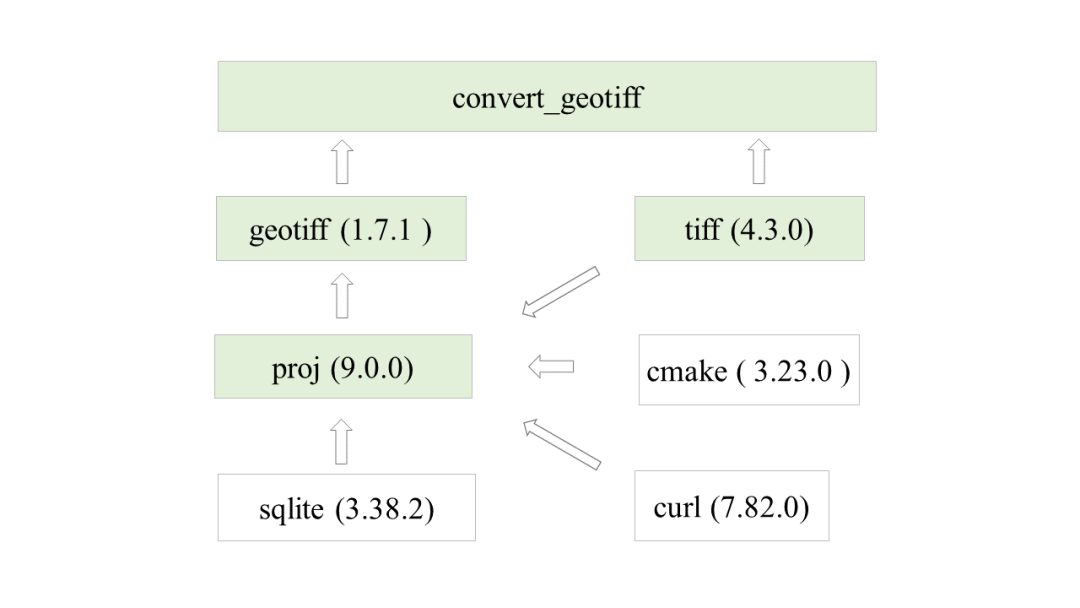
convert_geotiff的相关依赖关系如图所示

依次安装以上库,其中libtiff、sqlite、curl用make命令安装(较新版本可能是cmake命令安装)

make命令安装

这里以libtiff为例(make命令),下载路径为 http://download.osgeo.org/libtiff/

1
2
3
4
5
6
tar -xvf tiff-4.3.0.tar.gz
cd tiff-4.3.0/
./configure --prefix=your_install_dir/tiff
make
make check
make install

其中tar即为解压tar.gz压缩包的方法,./confiugure是建立安装配置,–prefix后面接上自己的安装目录,还可添加其他配置,按需要可添加

其他包亦可按此步骤安装(下载链接:sqlite,curl,proj

cmake命令安装

对于需要cmake命令安装的库,以proj为例

1
2
3
4
5
6
7
8
9
10
11
12
13
14
15
tar -xvf proj-9.0.0.tar.gz 
cd proj-9.0.0/
mkdir build
cd build
cmake .. -DCMAKE_INSTALL_PREFIX=your_install_dir/proj \
-DSQLITE3_INCLUDE_DIR=$SQLITE3_HOME/include \
-DSQLITE3_LIBRARY=$SQLITE3_HOME/lib/libsqlite3.so \
-DTIFF_INCLUDE_DIR=$TIFF_HOME/include \
-DTIFF_LIBRARY_RELEASE=$TIFF_HOME/lib/libtiff.so.5 \
-DCURL_INCLUDE_DIR=$CURL_HOME/lib \
-DBUILD_TESTING=OFF \

make
make install

cmake可以直接安装通过以下命令:

1
sudo apt install cmake

cmake安装先要创建一个build文件夹,再在build文件夹中执行安装命令,其中..代表回到上级目录,这是因为makefile会生成在原目录中

$TIFF_HOME$等代表环境变量,在.bashrc文件中配置

1
export TIFF_HOME=/home/palwe/app/tiff

按这种形式分别将上面安装的库添加到环境变量

之后仍然需要make命令生成库的,lib,bin文件夹

geotiff安装

安装geotiff库(下载地址:http://download.osgeo.org/geotiff/libgeotiff/)

1
2
3
4
5
6
7
8
9
tar -xvf libgeotiff-1.7.1.tar.gz 
cd libgeotiff-1.7.1/
./configure --prefix=your_install_dir/geotiff \
--with-libtiff=your_install_dir/tiff \
--with-proj=your_install_dir/proj \
--with-zlib --with-jpeg
make
make check
make install

convert_geotiff安装

安装convert_geotiff库(下载链接:https://github.com/openwfm/convert_geotiff)
安装命令:

1
2
3
4
5
export CPPFLAGS="-I/your_install_dir/tiff/include -I/your_install_dir/geotiff/include"
export LDFLAGS="-L/your_install_dir/tiff/lib -L/your_install_dir/geotiff/lib"
./configure --prefix=your_install_dir/convert_geotiff
make
make isntall

也可以直接将环境变量配置到.bashrc文件中

configure时出现的错误可以尝试加上lib的环境变量

1
export LIBS="-lgeotiff -ltiff -lproj -lz -ljpeg -lm"

make时出现的问题可以直接修改Makefile解决
出现报错:

1
/usr/bin/ld: geogrid_tiles.o: undefined reference to symbol 'ceil@@GLIBC_2.2.5' /usr/bin/ld: /lib/x86_64-linux-gnu/libm.so.6: error adding symbols: DSO missing from command line collect2: error: ld returned 1 exit status make: *** [Makefile:357: convert_geotiff] Error 1

缺少数学库-lm的链接,可以执行:

1
2
sed -i 's/-lgeotiff -ltiff/-lgeotiff -ltiff -lproj -lz -ljpeg -lm/' Makefile
make -j1 V=1

解决问题

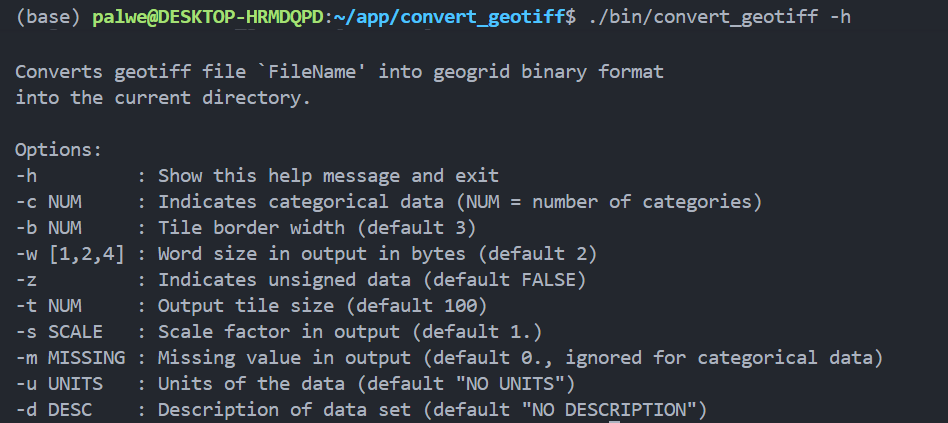
安装成功可以运行./bin/convert_geotiff 测试,出现
结果
即可说明安装成功

可将convert_geotiff加入环境变量,以便随时调用

Modis数据的下载、拼接和转换

1、下载数据

注册NASA Earthdata并下载Modis数据(https://lpdaac.usgs.gov/products/mcd12q1v006/)

按照网络上的教程选取需要的数据并获取下载.sh脚本,在Linux系统中运行下载hdf影像

接下来进行影像格式的转换和拼接

2、转换并拼接数据

hdf数据常用NASA提供的MRT工具处理,然而NASA官网已于2019年下架MRT。不过官网提供了多种工具处理影像,其中Heg工具即可满足我们的要求

安装Heg(https://wiki.earthdata.nasa.gov/collector/pages.action?key=DAS)

安装之前需要配置java环境,可参考网络教程,这里不再赘述

在官网下载Linux版本的heg压缩包,解压后会有一个install文件和tar压缩包

运行install文件,按指示输入

1
2
3
4
5
6
7
8
9
10
11
12
13
14
15
16
17
18
19
20
21
22
23
24
25
26
27
28
29
30
31
32
33
34
35
36
37
38
39
40
41
42
43
44
45
46
47
48
49
50
51
52
53
54
55
56
57
58
59
60
61
62
63
64
HDF-EOS To GeoTIFF Conversion Tool (HEG) Installation
----------------------------------------------------------

To install the HEG Tool:

1. The heg.tar file must be present in the current directory.
2. You must know the directory path where the HEG is to be installed.
3. You must know the path to the Java bin directory on your system.

Do you wish to proceed with the HEG v2.15 Build 9.8 installation? [y/n]
y

Where would you like to install HEG?

IMPORTANT NOTE:
Be sure to give an absolute directory path, without special characters.
For example: /home/faculty/jsmith/heg

To install HEG in a subdirectory of the current directory, just press the ENTER key.

Enter the HEG directory path:


WARNING: Directory /home/palwe/app/heg/heg already exists.
Proceeding with install may overwrite existing files.

Proceed with install into /home/palwe/app/heg/heg? [y/n]
y
.....Moving heg.tar to /home/palwe/app/heg/heg
.....Untarring heg.tar

*******
-- Untar executed successfully! --


Where is your java bin directory located?

IMPORTANT NOTE:
Give an absolute path, without special characters.
For example: /usr/java/bin

Enter the path to your java bin directory:
/home/palwe/java/jdk1.8.0_461/bin

You will be able to run HEG from the command line, but you may
have problems with the HEG GUI. After installtion is completed,
try running the HEG shell script in the HEG bin directory.
If the GUI does not appear, make sure Java is installed on your system.
Then locate the Java bin directory and reinstall the HEG.

Please enter a username to be used internally by HEG, (e.g. BOB):
BOB


*****************************************************************
* Congratulations! You have successfully installed *
* HDF-EOS To GeoTIFF Conversion Tool (HEG) v2.15 Build 9.8 on your system! *
*****************************************************************


To start HEG, type "HEG" at the command line in the
following directory:
/home/palwe/app/heg/heg/bin/
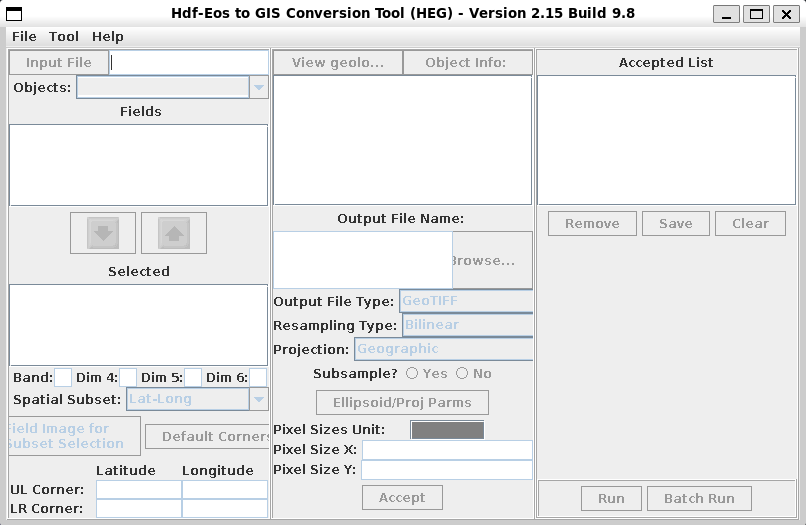
安装成功后运行HEG即可调出GUI界面进行数据处理
GUI

将HEG加入环境变量即可随时调用

3、数据拼接与转换

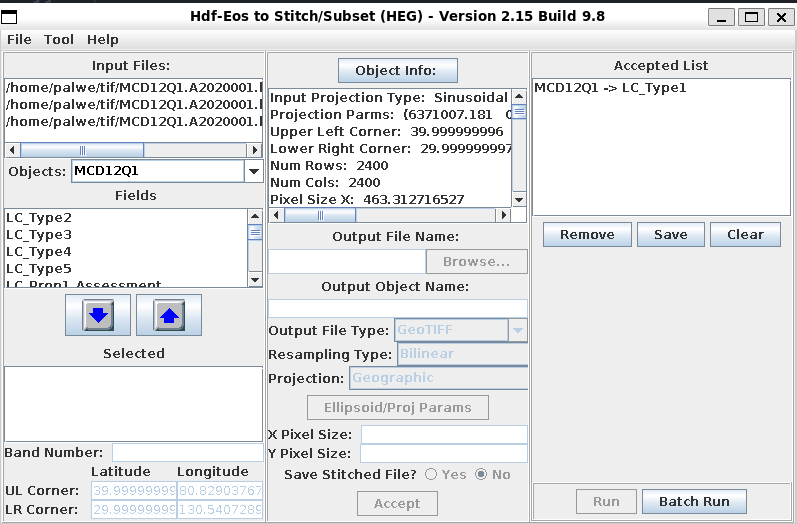
点击Tool 切换至Stitch/Subset工具,选择数据文件夹导入数据方法,左侧选择波段,这里我们选择LC_Type1

输出格式选择GeoTIFF,重采样选择Bilinear,投影选择Geographic 设置完成后点击accept,最后点右下角Batch Run即可输出拼接影像

拼接

利用convert_geotiff转换tif文件到二进制文件

输入命令

1
convert_geotiff -w 1 -t 5000 -u "category" -d "500m 17-category IGBP-MODIS landuse(China)" -b 0 -m 0 ../image.tif

-w 1:土地利用表征数字为从1-21(这里到17),使用一个字节进行存储就足够了

-m 0:tiff文件中用0来表示缺测值

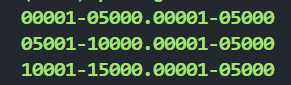
生成类似文件二进制即代表转换成功


参考教程:
1、https://mp.weixin.qq.com/s/FzU6dEYGVKbhvLrFwXieig
2、https://cloud.tencent.com/developer/article/2297389


在Linux环境中转换tif文件为二进制文件
https://e-golem.github.io/2025/09/23/geotiff转换/
作者
Pengwen Zhang
发布于
2025年9月23日
许可协议